
Think about the last ten conversations you had with an AI coding assistant. You probably solved real problems. Discovered why a build was failing. Figured out the right pattern for handling authentication in your framework. Learned that a particular API returns dates in an unexpected format.
Now ask yourself: where did all of that knowledge go?
Either nowhere, or buried in some random memory file in Claude's user directory. Who knows. And the next time you or a teammate hits the same problem, the AI starts from zero. No memory of the mistake. No recall of what worked. Every conversation is a blank slate.
That's the problem with how most of us use AI right now. The conversations are productive, but the knowledge is disposable. I built the ai-knowledge plugin for Claude Code to fix this. It captures what you learn during development, organizes it into a persistent knowledge base, and makes sure Claude loads the right context automatically in future sessions. The result is an AI that actually remembers how your project works.
The Problem: Expensive Knowledge, Disposable Conversations
Every developer builds up project knowledge that never makes it into documentation. The stuff nobody thinks to write down:
- The CSS framework's dark mode utility doesn't apply to dynamically injected elements, so you need a manual class toggle
- The API rate-limits differently in staging vs. production, and the error message doesn't say so
- The build process silently drops environment variables that contain special characters
- Component naming follows a specific convention that new contributors always get wrong the first time
That kind of knowledge is expensive. You earn it by debugging, experimenting, and occasionally breaking things in production. And when you earn it inside an AI conversation? It's gone the moment the session ends.
The CLAUDE.md File Is a Start, Not a Solution
Claude Code reads a CLAUDE.md file at the start of every conversation. Most developers use it to describe their project structure, list common commands, and set coding conventions. It works well. But it doesn't scale.
As your project grows, so does the knowledge you need Claude to have. Authentication rules, deployment gotchas, API quirks, testing patterns, security constraints. Cramming all of that into a single file creates a problem: Claude loads the entire file into its context window at the start of every session, whether or not any of it is relevant to the task at hand.
A 200-line CLAUDE.md works fine. A 2,000-line CLAUDE.md full of security conventions, component patterns, and deployment procedures wastes precious context tokens on information you might not need for the current task. And nobody wants to manually maintain a file that large.
The Three-Layer Knowledge Architecture
The ai-knowledge plugin creates a knowledge base that lives in your project repository, right alongside the code. Instead of one monolithic file, it's organized into three layers.
Layer 1: Topic-Specific Knowledge Pages
Individual markdown files in docs/kb/, each covering one topic. A typical web app might have pages for authentication patterns, database conventions, API design rules, and deployment procedures. Each file has YAML frontmatter with tags, cross-references to related pages, and a scope pattern that tells Claude when to load it.
---
tags: [auth, api, tokens, middleware]
related: [[database-conventions]]
created: 2026-04-05
last-updated: 2026-04-05
pinned: false
scope: 'src/auth/**'
---
# Authentication Patterns

Refresh tokens are stored in httpOnly cookies, never
localStorage. Access tokens expire after 15 minutes.
The middleware chain must validate the token before
any route handler runs...
Layer 2: Global Learnings
A single file (docs/kb/_global-learnings.md) for rules that apply everywhere. "Never commit .env files." "Always use pnpm, not npm." "TypeScript strict mode is on and unused variables fail the build." This file is pinned, so Claude loads it at the start of every conversation no matter what you're working on.
Layer 3: The Routing Table in CLAUDE.md
The plugin adds a Knowledge Base table to your CLAUDE.md that acts as a routing layer. Each row maps a topic to its file path and a "When to Load" condition. Claude reads this table and pulls in only the KB pages relevant to the current task.
| Topic                | File                                         | When to Load                                  |
| -------------------- | -------------------------------------------- | --------------------------------------------- |
| Auth Patterns        | docs/kb/architecture/auth-patterns.md        | Working on login, tokens, or session handling |
| Database Conventions | docs/kb/architecture/database-conventions.md | Writing queries, migrations, or models        |
| API Design           | docs/kb/conventions/api-design.md            | Creating or modifying API endpoints           |
| Global Learnings     | docs/kb/\_global-learnings.md                | Always (pinned)                               |
This is what makes the whole thing work. Knowledge is stored topic by topic, but loaded on demand. If you're working on a login flow, Claude loads the auth patterns page. If you're writing a database migration, it loads database conventions. Global learnings load every time. Context tokens go to information that actually matters for what you're doing right now.
Capturing Knowledge: From Conversation to Permanent Record
A knowledge base is only worth something if it actually gets filled. And let's be honest, the hardest part of any documentation system is getting people to write things down. The ai-knowledge plugin sidesteps this entirely by making Claude do the writing.
End-of-Session Capture with /kb-learn
This is the command I use most. At the end of a productive session, you run /kb-learn and Claude goes back through the entire conversation, looking for knowledge worth keeping.
It goes deeper than summarizing. Claude sorts what it finds into categories:
- Mistakes and anti-patterns (approaches that failed, so you don't repeat them)
- Techniques that worked and should become the standard approach
- External system behaviors, API quirks, environment-specific rules
- Codebase gotchas that catch people off guard
- Workflow preferences: how you like to commit, test, and deploy
Claude then proposes changes: new KB files to create, existing files to update, global learnings to add. Nothing is written until you approve it. You review what Claude captured, adjust anything that's off, and confirm. The knowledge base grows with every session.
Quick Capture with /kb-add
Not every piece of knowledge comes from a deep debugging session. Sometimes you just need to record a quick fact: a naming convention, a deployment requirement, a rule from a code review. The /kb-add command lets you add a single learning interactively, choosing where it goes, what tags it gets, and when Claude should load it.
Mining Existing Code with /kb-discover
This one is particularly useful. The /kb-discover command reads your actual source code and extracts the conventions hiding in it. Architecture patterns, naming conventions, API contract shapes, error handling strategies. All the stuff that exists in your codebase but was never written down anywhere.
Point it at a directory, and Claude reads the code, identifies patterns, and writes KB articles about what it found. If you're working on a project that's been around for a while with years of unwritten conventions, this is the fastest way to bootstrap a knowledge base.
Querying Knowledge: Your Project's Institutional Memory
Getting knowledge into the system is one thing. Getting it back out when you actually need it is where this gets interesting.
Synthesized Answers with /kb-query
/kb-query lets you ask questions against your knowledge base in plain English. Claude searches the relevant KB pages, pulls together an answer, and cites where it came from with wiki-style links.
/kb-query How does authentication work in this project?This isn't grep. Claude reads the relevant pages, follows cross-references, and assembles an answer that pulls from multiple sources. If the answer needed three or more KB files to put together, Claude offers to save the synthesis as a new KB article. That way you don't have to ask the same complex question twice.
Why This Beats Starting From Scratch
Without a knowledge base, every new Claude Code session starts the same way: Claude reads your CLAUDE.md and source code, then tries to piece together how things work. It figures out a lot on its own, but it's rediscovering everything from scratch. Every time. The gotchas aren't documented. The "we tried that and it broke because of X" history doesn't exist.
With a knowledge base, Claude walks into every session already knowing things. The conventions are documented. The anti-patterns are recorded from past sessions. The architectural constraints are there because /kb-discover pulled them from the code. It's a different experience entirely.
What It Looks Like in Practice
Here's a typical docs/kb/ folder for a full-stack web application after a few sessions of use:
docs/kb/
├── _global-learnings.md        # Cross-cutting rules (always loaded)
├── _index.md                   # Auto-generated catalog
├── architecture/
│   ├── auth-patterns.md        # Token handling, session rules
│   ├── database-conventions.md # Query patterns, migration rules
│   └── deployment.md           # CI/CD pipeline, environment config
└── conventions/
    ├── api-design.md            # Endpoint naming, error formats
    ├── testing-strategy.md      # What to test, mocking rules
    └── component-patterns.md    # Frontend component conventions
The number of pages grows with the project. Most get created through /kb-learn sessions and /kb-discover runs against the source code.
How It Changes the Workflow
Say you're starting a new Claude Code session to add an API endpoint. Claude reads the CLAUDE.md routing table and automatically loads the API design KB page. That page has your naming conventions, error response format, and validation rules already documented. Claude doesn't have to reverse-engineer those patterns by reading existing endpoints. It already knows.
Switch to working on the auth system, and Claude loads the auth patterns page instead. It knows how tokens are handled, where sessions are stored, which middleware runs in what order. Knowledge that was earned in a debugging session weeks ago is now available in every future session, automatically.
The Compounding Effect
After a few sessions of running /kb-learn, you start to notice it. Claude's suggestions get better. Not because the model changed, but because the knowledge base grew. Patterns you've established show up in new code. Mistakes you made weeks ago don't get repeated. Architectural decisions have their rationale recorded, so Claude stops suggesting alternatives you already considered and rejected.
That's the compounding effect. A CLAUDE.md captures what you know when you set up the project. A knowledge base captures what you learn as you build it.
Visualizing Knowledge with Obsidian
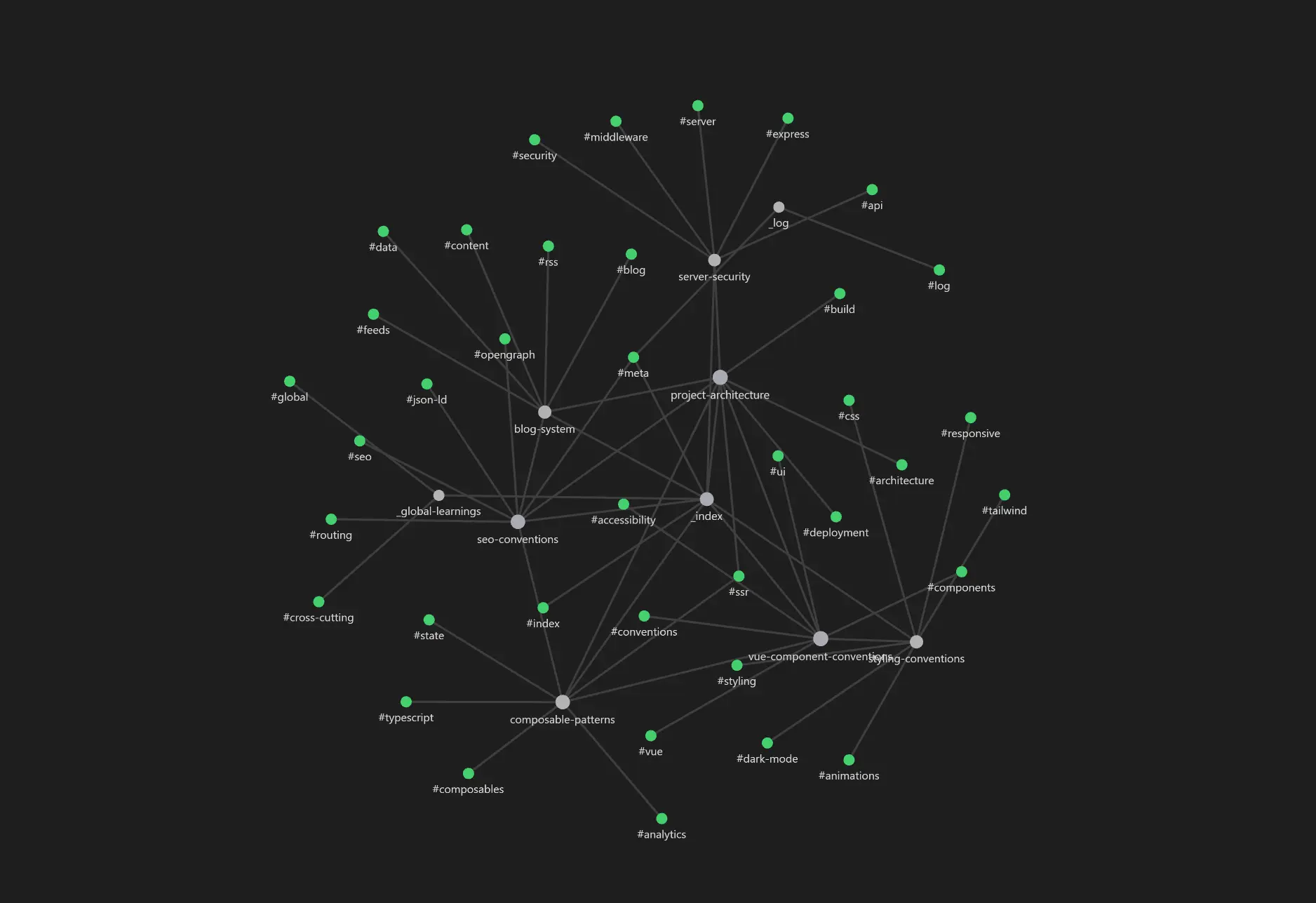
Every KB file uses YAML frontmatter with tags and [[wiki-links]] for cross-references. This wasn't an accident. The docs/kb/ folder is designed to work as an Obsidian vault. Open it in Obsidian and you get the graph view above: topics cluster together, cross-references show as connecting lines, and gaps in your documentation become obvious at a glance.
I use this across all my projects now. It's one thing to know your knowledge base has pages on auth and database conventions. It's another to see on the graph that they're not linked, even though every auth flow touches the database. That kind of visibility makes the KB better over time.
Beyond Your Own Project: Harvesting External Knowledge
Not all project knowledge lives inside the project. If you work on a team, there are probably shared conventions across repositories. A billing service has API quirks that every consuming service needs to know about. A deployment platform has undocumented behaviors that bite you in multiple projects.
The /kb-harvest command pulls knowledge from external sources: sibling repositories, shared documentation folders, individual files, or even web URLs. Each harvested KB page tracks its provenance, so you know where the knowledge came from and can re-harvest when sources are updated.
For teams running multiple projects, this means you can document a convention once in a shared location and harvest it into every project that needs it. Write the rule once, share it everywhere.
Installation & Getting Started
The ai-knowledge plugin is part of my open-source Claude Code plugin marketplace, which also includes ai-workflow, ai-security, ai-ado, ai-performance, and ai-git plugins.
Quick Start
# Add the plugin marketplace
/plugin marketplace add charlesjones-dev/claude-code-plugins-dev

# Install the ai-knowledge plugin
/plugin install ai-knowledge@claude-code-plugins-dev

# Initialize the knowledge base in your project
/kb-init

# Mine your existing codebase for implicit knowledge
/kb-discover

# After a productive session, capture what you learned
/kb-learn

# Query your knowledge base anytime
/kb-query How does authentication work in this project?
The Full Command Set
The plugin's slash commands are organized around three workflows:
Capture: /kb-learn, /kb-add, /kb-discover, /kb-harvest,
/kb-import, /kb-ingest, /kb-absorb
Query: /kb-query, /kb-search, /kb-load
Maintain: /kb-list, /kb-prune, /kb-remove,
/kb-organize, /kb-upgrade, /kb-auto
Stop Letting Knowledge Evaporate
Right now, using AI for development is like working with a brilliant contractor who gets amnesia between meetings. Great advice, real problems solved, and then they walk in the next day and ask "so what does your app do?" again.
A persistent knowledge base changes that. Claude Code goes from being a stateless tool to something closer to a colleague who remembers your project's conventions, learned from past mistakes, and knows what's already been tried. Each /kb-learn session makes the next one better. Each /kb-discover run captures conventions that would otherwise exist only in the code. And /kb-query lets you ask questions that might take a new team member hours to piece together.
The conversations are still ephemeral. They'll always be ephemeral. But the knowledge they produce doesn't have to be.