
I subscribe to a lot of RSS feeds. Security advisories, framework changelogs, engineering blogs, industry news. For years I bounced between RSS readers looking for one that didn't fight me. Every option I tried had the same problem: the app itself demanded more attention than the content I was there to read.
Popup tooltips introducing features I didn't ask for. Banners nudging me to upgrade. AI-generated summaries inserted between me and the article. Rounded corners and padded cards eating screen real estate like it was free. At some point the reader became the distraction.
So I built SereneReader. It's a modern RSS reader built on one idea: the content you're reading should be the only thing on screen. No noise. No gamification. No algorithm deciding what matters. Just your feeds, your way, and a reading experience that gets out of the way.
It's free to start and live at serenereader.com.
Developer Tooling
I built SereneReader because I needed it. As a developer, I read a ton: release notes, RFCs, security disclosures, blog posts from people building things I care about. RSS is still the best way to keep up with all of that. The readers out there just weren't keeping pace with how I actually wanted to use them.
Here's what I ended up building, and why it works the way it does.
Focused reading mode: the feature that started everything
I looked for this in every reader I tried and never found it. Press f and everything disappears. The sidebar, the header, the feed list, the unread counts. All of it fades out and you're left with the article on a pure black background, centered at a comfortable reading width.
It sounds simple, and it is. That's the point. When I'm reading a long technical post or a detailed security advisory, I don't want peripheral UI competing for my attention. Focused reading mode gives me the article and nothing else. A small feed name in one corner, the author and date in another, and a subtle scroll progress indicator. That's it.
Press f or Escape to come back. I use this feature dozens of times a day and it still feels like a relief every time the chrome drops away.
Keyboard-first, not keyboard-also
I spend most of my day in a terminal or an editor. Reaching for the mouse to navigate an RSS reader always felt like a context switch I didn't need. SereneReader was designed around the keyboard from the start, not bolted on after the fact.
j/kto move through articles in the listn/pfor next and previous article while readingfto toggle focused reading modesto star an articlebor[to go back to the feed listEscapeto exit focused mode or close panels
These aren't hidden shortcuts you discover in a help modal. They're the primary way to use the app. I can open SereneReader, scan my unread articles, read three posts in focused mode, star one for later, and get back to work without touching the mouse once. That's the kind of flow I was after.
Dense by design, not by accident
Most modern web apps are designed for full-screen browser windows. I don't use my browser that way. I tile windows side by side: editor on the left, browser on the right. That means my browser window is usually around 1100 pixels wide. Every RSS reader I tried wasted significant chunks of that space on padding, rounded cards, and decorative whitespace.
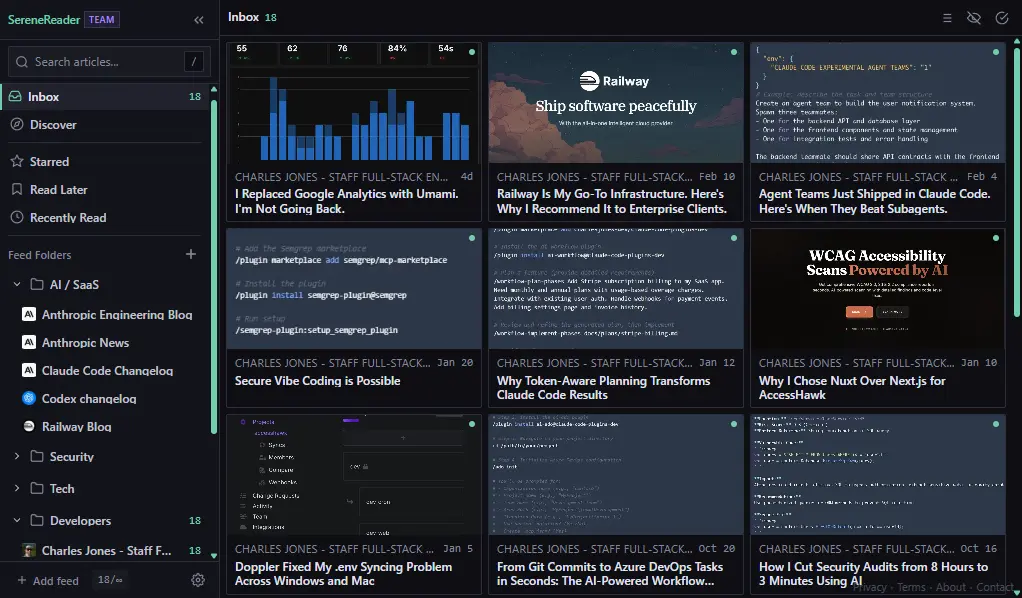
SereneReader's interface is deliberately dense. Thin 1px borders instead of shadows. Minimal padding, usually 4 to 8 pixels instead of the 16 to 24 that's become standard. Sharp corners. Full-width layouts that use the available space instead of floating in the center of it. The aesthetic is closer to a terminal or a tiling window manager than a typical SaaS dashboard.
I'm not going for a different look just because. I want to see as many headlines as possible when I'm scanning 50 unread articles across a dozen feeds, and I don't want to scroll to do it. The dense layout gets me there.
No dark patterns, no attention tricks
This is the hill I'll die on. SereneReader has no streaks, no badges, no notification anxiety. There are no popup modals telling you about new features. No banners asking you to rate the app. No AI-generated summaries injected between you and the content. The unread count is there if you want it, but it's not pulsing or color-coded to create urgency.
The core philosophy is simple: calm over chaos. An RSS reader should reduce your information anxiety, not contribute to it. Every design decision in SereneReader runs through that filter. If a feature creates pressure to engage, it doesn't ship.
I built SereneReader for people who are tired of apps competing for their attention. If you've ever opened a feed reader and spent the first 30 seconds dismissing tooltips and banners before you could actually read anything, you know exactly what I mean.
Sharing works the same way. You can send someone a share link and they can read it right there, no account required. Here's one from my earlier post about replacing Google Analytics with Umami. That's the actual reading experience, not a watered-down preview trying to get them to sign up.
Real-time updates without the refresh button
SereneReader uses Server-Sent Events to push updates to your browser in real time. When new articles arrive from your subscribed feeds, the unread count updates live. You don't poll, you don't manually refresh, and you never see stale data.
Behind the scenes, a BullMQ worker handles feed fetching on a schedule, respecting each feed's Cache-Control headers and ETags so it's not hammering servers unnecessarily. When new articles come in, they're pushed through Redis pub/sub to your active SSE connection. The UI updates optimistically, so actions like marking an article as read or starring it feel instant.
Honestly, you stop thinking about it. The feeds just stay current. That's the whole idea.
Migrate in minutes with OPML
If you're already using another RSS reader, you probably have dozens or hundreds of feed subscriptions built up over years. SereneReader supports OPML import and export, which is the standard format every major reader uses for feed lists.
Export your OPML file from your current reader, import it into SereneReader, and your entire feed library comes with you. Folders and organization are preserved. The whole process takes a couple of minutes, and you can export back out anytime if you want to try something else. No lock-in.
The stack behind it
SereneReader is built with Nuxt 3, TypeScript, MongoDB, Redis, and BullMQ. It runs on Railway with the web service, worker, and databases co-located for low-latency internal communication.
The architecture uses a canonical feed model. When multiple users subscribe to the same feed, the articles are stored once and user-specific state (read, starred, saved for later) is tracked separately in a sparse collection. This keeps storage efficient and means the worker only fetches each feed once regardless of how many people subscribe to it.
Authentication is passwordless. You either sign in with GitHub or Google, or enter your email and get a one-time code. I didn't want to build a password reset flow and I didn't want users to have yet another password to manage. Sessions are cached in Redis with HMAC-signed tokens.
Styling is SCSS with CSS variables for theming. I went with that over Tailwind because I wanted full control over the density and spacing without fighting utility classes. There are eight theme presets, Jade Night being the default. Each theme touches borders, backgrounds, and accent colors so it actually feels like a different mood, not just a palette swap.
The whole project is a pnpm monorepo with Turborepo orchestration. Shared types, validators, and database schemas live in a common package so the web app, background worker, and admin dashboard all stay in sync.
Free to start
There's a free tier that gives you enough to get started and see if the experience clicks for you. No credit card required. If you decide it fits how you work, paid tiers unlock more feeds, longer article retention, and all eight themes.
Head to serenereader.com and try it. Import your OPML, grab a few feeds from the Discover page, and press f on the first article. That moment when the chrome drops away and it's just you and the words is why I built the whole thing.
Conclusion
I built SereneReader because I was spending more time fighting my RSS reader than actually reading. Every alternative I tried had good intentions buried under layers of features, upsells, and UI clutter that got between me and the content.
SereneReader is the reader I wanted and couldn't find. It's opinionated about keeping things quiet and staying out of the way. If that sounds like what you've been looking for, it's probably because you've been putting up with the same stuff I was.
It's free to start and it's live. Give it a try at serenereader.com.